
Restoration Tips
#1 If you carefully scrub that front slick with Simple Green sprayed on a soft cloth, I bet most of that dark rub-wear comes off. Ancient record dealer secret, makes VG an EX. Next lesson “invisible tape repair.” – Otis
#2 A handy tip for warped lps:
ingredients:
1 warped lp
2 sheets of glass (must be larger than the lp diameter)
3. a sunny day
method:place the lp on a sheet of glassplace the other sheet of glass on top of the lpstand the lot in the sun for a bitas the sun softens the lp, the weight of the glass will gently flatten out the record again and won’t damage the grooves
Many times basic repairs to your LP jackets can really spruce up the cover and increase the grade a notch. For example, A VG- cover can increase to a VG grade, a VG moves up to a VG+. Below are some basic repair tips I have gleaned over time that I will share with you. If anyone has other tips, please let me know and I will update the guide.
- If at all possible, always make your seam and spine repairs using glue. I have found Elmer’s Office Glue Stick to work great. It’s a gel adhesive that comes is a push up stick and dries clear and bonds very well. You will need to have a small flat head screwdriver to apply the glue. Scrape the screwdriver across the glue stick so the top of the scewdriver has a small amount of adhesive on the tip. Now carefully open the split seam enough so you can apply the glue from the tip of the screwdriver to the inside of the cover. Be sure to apply at the very top of the inside of the LP jacket. If you apply the glue to low, you won’t be able to slide your LP inner sleeve in when it dries.
- Once you have applied the glue along the seam (one side of the seam is fine), press the seam together and take a paper towel, lightly dampened with water, and slide it along the top of the seam or spine you just glued. What this does is remove any excess glue on the outside of the LP cover and smooths out the flaking from the seam being broken.
- Now clamp the seam or spine down with a series of black binder clips. Make sure the binder clips are positioned so they are clamped to the very top of the repaired seam or spine. Let the clamped cover sit for several hours.
- After several hours, you can remove the binder clips. Your seam or spine is now repaired.
Seam & Spine Splits – Repairing with Tape. I recommend making repairs with glue but if you decide to go the tape route then I recommend using acid free photo & document tape. Make sure the tape is clear and not opaque (the brand I use is Scotch). The acid free part is very important because acid free tape will not yellow over time.
- Simply measure out the piece you need and press the tape onto the front side of the LP cover. Now flip the jacket over and gently pull the tape so there is a tight fit over the spine or seam and then press down. Trim the excess tape at the corners or LP opening with a straight edge razor. The straight edge razor ensures a very clean cut up against the LP slick. Since the tape is clear document and photo quality, it will blend nicely into the LP front / back slick. I have applied this technique with some of my LP covers and the blending is excellent.
Seam Separation Repairs: This is different than a seam split. A seam separation is when the LP jacket’s seam becomes separated (versus a split) due to the original glue used by the record company becoming aged / brittle and no longer able to adhere the cover together . This is prevalent with covers manufactured starting in the 1980’s.
- You can use the Elmer’s Glue Stick, but I found a very quick and effective fix is to apply double sided tape over the original glue line. Scotch sells the double sided tape in hand held dispensers and works great. Apply the double sided tape with 2-3 runs to make sure you have enough adhesive and then simply press down.
Removing Stickers. Most sticker will come off by applying a product like Goo Gone to the label or sticker.
-
Take a Q-Tip and dip it into the Goo Gone. Now apply the Goo Gone to the entire surface of the sticker and of course along the edges. Let the Goo Gone sit for a few minutes. After a few minutes, use your fingernail and gently pull back the sticker or label. Do NOT attempt to take the sticker or label off in one fell swoop. You will tear the LP slick. Once you get an edge of the sticker lifted, dip your Q-Tip back in the Goo Gone and dab underneath the lifted section of the sticker. Allow the Goo Gone to sit a couple of minutes so it can dissove the adhesive. Continue this process until the sticker or label is completely removed.
-
I do not recommend using Isopropyl alcohol. Too much Isopropyl alcohol will leave a permanent pink discoloration. If you have ever seen a peeled Beatles Butcher with a pink hue to it, that’s why. The cover was peeled using too much Isopropyl alcohol.
- Contribution from another Ebay member – to remove stickers nothing beats Ronsonol ligher fluid. It will not leave any dark marks (which Goo Gone can be guilty of). It evaporates in minutes and will not eat at the colors or paper. Apply to the entire sticker (use a Q-Tip) and then set a poly outer sleeve and a book as a weight on top of the sticker, Wait 1-2 minutes and peel the sticker away. Technique and length of application varies based on different adhesives but 3 minutes would be the high end. As with Acetone, do not drip Ronsonol on your vinyl. It will damage the record surface.
Removing Ink & Markers: This is by far the most difficult repair to make. Permament markers and pen ink are extremely tough to remove. In most cases, if the writing is not overly intrusive, it is best to leave well enough alone. But here are some techniques that I have used with varying levels of success:
-
If you are looking to remove marker or ink from a laminated cover like the old Beatle UK flipback jackets, I found success in removing both marker and ink by using a dry erase marker. Simply apply the dry erase marker over the writing you are looking to remove. Let dry for a several seconds and then wipe. The old marker and ink writing will also rub off. Do not apply this technique to a non-laminated cover. The dry erase marker will have the same effect as a permanent marker and you just made your situtation worse.
-
Concentrated (non-diluted) Simple Green works well on removing ball point ink from covers (it does not do as good a job on permanent marker). You need to be careful not to rub too hard otherwise you will remove the print from the LP jacket.
-
If the writing is in pencil, I have found an eraser like a Staedtler Mars Plastic (you can pick it up in Office Depot, etc.) works great.I have even found it works fairly well on ink if the ink was written lightly. Be careful on LP labels though. You run the risk of removing the color from the label if you erase.
-
Another technique is to apply acetone. Acetone evaporates is seconds and is very good at removing ink and markers. However, there are two things you need to know: Never spill acetone on your vinyl records. It will damage the record instantly. Also, if the ink or marker has set for a long time, you will not be able to completely remove all the writing. The trick to working with acetone is to apply it in a targeted fashion (e.g., with a Q-Tip – do not apply it in a broad based fashion) and then immediately dab with clean soft cloth. Repeat this process until the un-wanted blemish has been removed to your satisfaction.
- Contribution from another eBay member – to remove pencil, dirt and grime try a Kneaded Eraser. They are clean, with minimal crumbling and non-abrasive. Rub with light pressure to remove pencil marks, dirt and grime. Be sure to “knead” the dirty portion of the eraser back in so you are always working with a clean section of the eraser. Eraser will need to replaced after a dozen covers or so but are inexpensive and can be purchased at any art or stationery store.
- Contribution from another eBay member – to remove ink try a product called “Krazy Kloth”. Will do an excellent job of removing most inks. It will leave a slight oily residue which comes up upon wiping with a paper towel, leaving no marks. As with any ink removing product, it is highly recommended you practice and test on junk covers before attempting a fix on one of your prized LP jackets. If you rub to hard or to long, you will remove the cover art ink.
Word of caution: I have found that attempting to remove marker or ink from a label usually ends up making the situation worse . Before getting bold and tackling one of your prized LPs, I would practice on some junk vinyl, this way you won’t destroy your collectible copies if your experiment ends up less than desirable. You can pick-up some cheap records at a thrift store or flea market to experiment with.
Cleaning Up Dirt & Grunge from LP Slicks:
-
Use a product like a contractor’s soot and dirt removing sponge (Ace Hardware sells them) to wipe the cover’s surface area. This is a dry sponge that requires no water. You will be astonished at how much the sponge picks up after wiping the album cover surface several times. This sponge works especially well on textured, non-glossy slicks (e.g., George Harrison’s All Things Must Pass and Bangladesh).
-
This next step is to spray some Windex on a paper towel. Do not saturate. Gently wipe the jacket surface area with the sprayed towel. More dirt will come off and after a few minutes, the cover will be completely dry and you should see a marked difference in appearance. Do not rub hard otherwise you run the risk of removing the print on the slick. Be especially careful with Sgt Pepper slicks. It doesn’t take much rubbing to remove the blue background on the front cover.
-
For UK laminated covers (front and back), applying concentrated Simple Green onto a paper towel and then wiping both the laminated front slick and the non-laminated back cover works great. Another eBay Beatle collector told me about this technique and lo and behold, it worked very well. I was able to improve the appearance (and grading) of my old UK flipback covers. Let the covers dry for several hours after cleaning them. You may see some dampness in between cracks in the laminate but not to worry, after letting the cover dry, the damp spots will evaporate and disappear.
-
Contribution from another eBay member – for removing dirt, soot, gunk and some ink and water marks try Magic Eraser. The best type are those that can be rinsed and reused. Very lightly dampen one end of the sponge and stroke / rub lightly and specifically where needed. Then use the dry end of the sponge to quickly pick-up any residual grime. Quickly wipe with a dry paper towel. This approach does not work well on porous paper covers but works great on most LP jackets. This technique takes a bit of practice so it is recommend you try it out on some junk covers until you get it down to your satisfaction. Results are excellent.
Repairing Tears or Rips:
-
If there is a tear in the slick and the torn piece of the slick is still present, apply the Elmer’s Glue Stick and press down. It works great.
-
If you have a tear at the opening or mouth of the LP cover, take a piece of tape and apply it to inside of the cover and then press down. I normally use clear packaging tape for this type of repair because packaging tape is far more durable than run of the mill Scotch tape.
Restoring a White Album Cover: Virtually all Beatle White Album covers have ring and shelf wear unless the record was purchased and immediately stored in a vault. They are also notorious for seam splits. Well, the seam splits can be repaired as described above, but what about restoring the front and back slick? Here’s how:
-
First, remove the records from the jacket! Use the contractor’s sponge described above to remove any overt topical dirt. Then use the Windex on a a paper towel to remove any additional embedded dirt / grime. These first two steps are important – do not skip over them. Now with a clean automobile waxing applicator, dab a little Scratch Out (yes, the same Scratch Out used on cars – you can get it at any auto store) and rub the scratch out on the LP slick in a circular motion. Wait a few minutes and let the Scratch Out dry. With a clean cotton cloth, gently polish the cover free of the Scratch Out. Most of the ring wear and jacket wear disappear before your eyes. Not only will your White Album look much cleaner but it will also have a nice glossy sheen.
-
If your White Album is numbered, do not apply the Scratch Out on the number – work around it. Rubbing the Scratch Out on the number may remove / fade the numeric print.
-
This technique does not remove water damage or ink / marker.
Removing Mildew & Storage Odor: Mildew is tough to combat, but I have had decent success with this method;
-
Remove the LP and inner sleeve from the jacket. Open the mouth of the LP cover (not too much – you don’t want to split seams) and spray a shot of a odor neutralizing product like Oust into the inside of the cover. Make sure you are using an aerosol spray and not a liquid spray. A liquid spray product will wet the inside of the jacket and you run the risk of damaging your cover. Let the LP cover sit overnight. Do not seal it up or close up the opening of the cover. The next day you should notice a lot less of the mildew or storage scent. If the cover needs another dosage, simply repeat the process.
-
Contribution from another eBay member – put the cover (without the record) in the microwave for 20-30 seconds. The microwave will extract the moisture. Repeat as necessary for a clean smelling sleeve.
A few notes that might be helpful to you, and your readers.Laminated and Unipak Sleeves :Laminated UK sleeves tend to ” pop “for a very simple reason… The next time one of yours does, look closely at the flap that came loose. You’ll almost certainly notice, that the glue which the printer applied, is ON THE LAMINATION, a Non-pourous surface. If you lightly sand the flap surface with 200 grit sandpaper, before re-gluing, it will scuff and remove enough of the laminate to ensure that the glue is binding the paper, to the paper.
I would also recommend sanding the flaps of US Unipak sleeves. These sleeves are generally printed on ” coated stock “, usually lightly varnished to harden and seal the surface. Many of these covers were sealed with a heavy bead of very brittle glue. Sanding removes the glue and opens the pores of the paper, allowing the glue to penetrate the paper surface and forming a much stronger bond.
SEAMS !
Your seam repair method works very well
on smaller splits, but on large ones, and where sleeves have completely split, you can make a more permanent repair, using the method used to ” re-spine ”
books.The paper used for paste-over covers is fairly light-weight, and edge-gluing makes a visually acceptable repair, but does not in any way , strengthen the cover. For a more permanent fix, it’s best to repair the splits, INTERNALLY.
This requires some practice, and a good deal of dexterity, but …..
The easiest way to do this, is with self-adhesive sheets, like Avery Labels.
In order to ensure that you do not make the split larger, apply a strong binder clip at the end of the tear.Use strips that are larger than the area to be repaired, Leave the removable backing on, and fold the strip, lengthwise, into a ” V “, with the adhesive face on the outside. Peel the backing from one side of the “V” and position it over the split.
Burnish it to ensure it’s flat, and then remove the rest of the backer, and burnish the other side.
On sleeves which have completely split,
the Acid-Free Brown Kraft tape used for mounting prints is recommended ( NOT the packing tape with the strings in it ! ) . A good Art or Framing shop should have it in stock. It can be folded into the ” V” shape needed, before moistening.
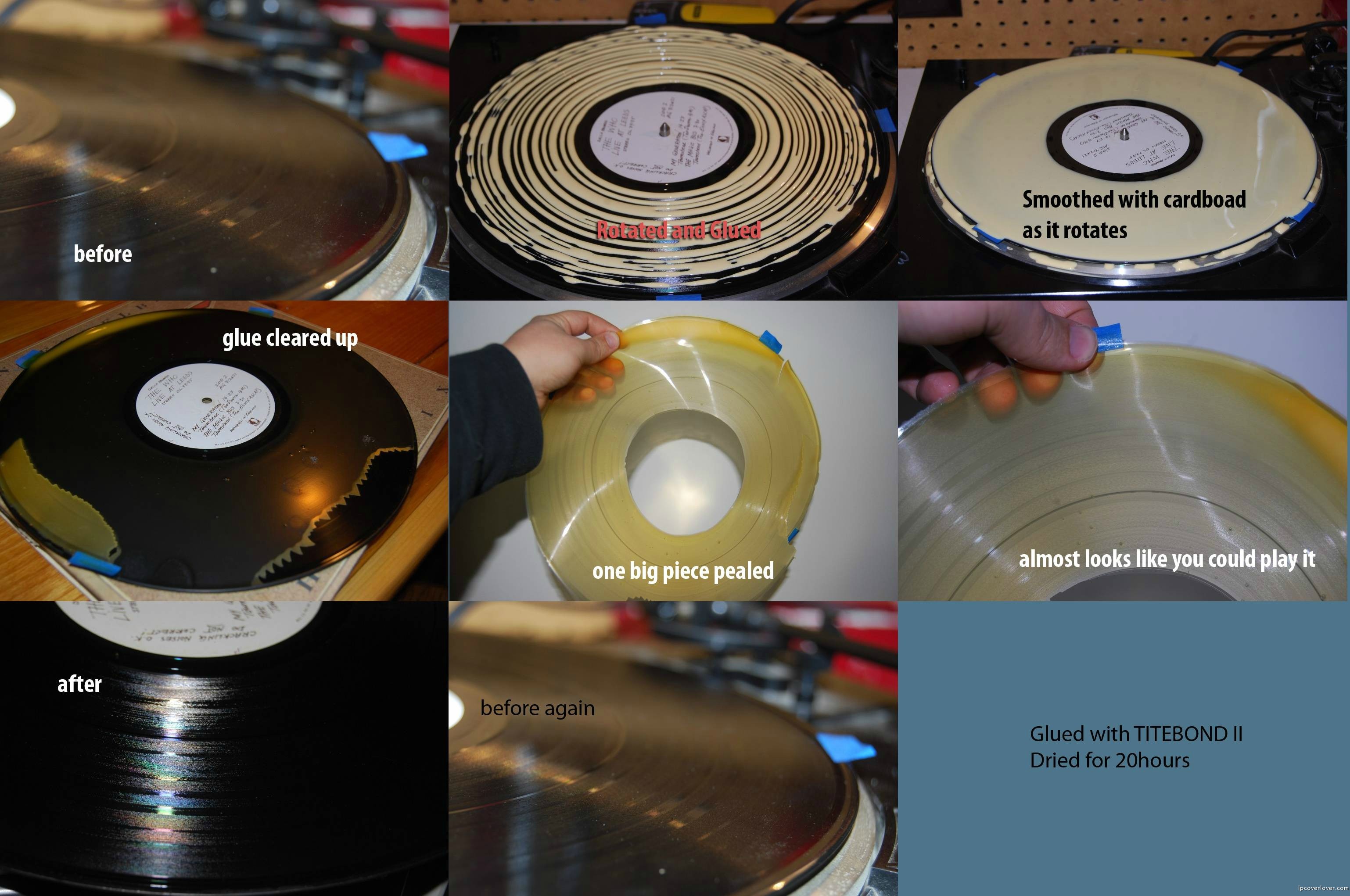
Clean your records with glue! http://www.reddit.com/r/pics/comments/kcxon/glue_record_cleaning/




May 21st, 2007 at 3:17 am
a handy tip for warped lps:
ingredients:
1 warped lp
2 sheets of glass (must be larger than the lp diameter)
3. a sunny day
method:
place the lp on a sheet of glass
place the other sheet of glass on top of the lp
stand the lot in the sun for a bit
as the sun softens the lp, the weight of the glass will gently flatten out the record again and won’t damage the grooves
May 21st, 2007 at 12:11 pm
thanks! never tried this, but it sounds good
June 22nd, 2007 at 7:12 am
Matt: What a great site just stumbled on it and the jackets are brilliant. I use the exact method to repair spine and seam splits and to touch it off, you can get a pack of felt tip markers to bring back the original color by dabbing it along the seams. It covers any glue residue as well as eliminates any discoloration from the original seam split. Works perfect on primary colors. Been doing this for years and have never had any one complain about any repairs. Thanks Bob Perry
June 22nd, 2007 at 8:37 am
Hi Bob! Thanks for your note. I think Jack would have enjoyed this site! Wish I had done it years ago with him. I hope all’s well with you.
January 17th, 2008 at 4:11 pm
Terrific website and several good tips I’m anxious to try.
On the warped record instructions – how long is a “bit” in the sun, any specific amount of time?
Thanks for sharing your expertise.
Doug
January 21st, 2008 at 9:34 am
Tip for removal of stickers: use a lighter and heat up the sticker, in most cases stickers come of instantly. The older the sticker, the longer you usually need to heat it up.
January 27th, 2008 at 7:49 pm
Greetings,
Thanx for tons of great Lp covers and choice resto tips.I can only add one that I like to use with great sucess:To remove stickers from Lp covers or from labels,I use the lighter fluid technique,but I have a very thin paint scrapper that I use to remove the label.First you have to round the sharp corners on the scrapper,so as to not tear the cover,and I also round out the flat part of the blade as well.I pour a squirt of good ‘ol Ronson (just like Jimi @ Monterey!) on the sticker,let it soak a minute,then carefully slip the scrapper between the cover and the sticker.Once the sticker starts to lift,give another little squirt of fluid under it and carefully work the scrapper side to side and the sticker comes off cleanly and the cover stays nice.I use this technique because I found that by pulling the sticker with your finger nail or just pulling it off can sometimes damage or bubble the cover.By using the scrapper technique,you have more control to take your time to remove the sticker.It takes some practice and the right feel,so practice on those JFK and Herb Albert records and it will soon be a valuable technique to use.For water based stickers(like return address stickers),I use some hot tap water and apply with a Q-Tip on the sticker,let it soak,then slide off the sticker.Be careful on red,blue or purple labels as this may cause some discoloration.
April 6th, 2008 at 7:32 pm
Just a little addition here, to the great tips already spelled-out…
After I have cleaned the outer (front and back) and inner covers, if it happens to be a gatefold, and provided it is a glossy or even dull matte finish, on the cardboard, I have used Pledge Furniture Polish, (just a spot on the washcloth will work), and work it into the cover, for some added brilliance. Remember though, it will not work too well on paper (plain cardboard) covers.
July 20th, 2008 at 2:55 am
Heat can work for sticker removal. I use a blowdryer (remove lp from cover 1st!) to soften the adhessive and to keep it soft while I remove
the sticker. For removal your fingernail will work as well or better than
most other methods/tools I’ve tried. There is a brand of sticker removal
spray (Japanese) that comes with a small white plastic tool the size of a que-tip which has a wedge shaped end which can sometimes work amazingly well. As in all sticker removal, do it slowly and carefully. Heat guns, which produce a much hotter stream of air than blow dryers, are much too powerful for this application. Also citrus cleaners (orange whatever) can work wonders on some covers (on a soft cotton or other
soft applicator, then on the cover surface) but as you know it’s hard to tell sometimes which kinds of surfaces will react well with whcih sorts of cleaner/solvent. Rubber Cement is a very safe and non abrassive alternative to rubber erasers, just spread it on, let it dry a few seconds, and wipe it of with clean fingers.
October 25th, 2008 at 5:15 pm
Just used the hair dryer method for removing a sticker. IT WORKED LIKE A CHARM!!!!! This internet thing can be useful. THANKS!!!!!
February 3rd, 2009 at 6:05 am
Hi there,
To remove marker, believe it or not I use an old cotten t shirt and spit. stretch some shirt over your index finger, lick the end then gently whip a bit. then finish off with some dry portion of the shirt till the marker is gone.
It has worked for me on many occasion. As with anything, just be careful
February 10th, 2009 at 6:08 pm
Hey!
I have a question, I have the white album, and many others that had some slight water damage. Is there anyway to get rid of it. Can for an example- wipe it off with a spray or liquid of some sort. Thank you soo much!
February 15th, 2009 at 5:49 am
How can I remove 3 small droplets of white decorator’s paint from the gloss laminate on a 1950s US Prestige jazz album cover, without damaging the laminate? The paint is not brittle enough to scrape away wit a scalpel blade, and Ronsonol, isopropyl alcohol, mild detergent and distilled water all failed to remove the paint. (I think the album was rescued from a building site – I’ve removed back tar from this one, but the paint defeats me. Thanks in advance to anybody who has any ideas on this!
March 1st, 2009 at 4:53 pm
WHAT GLUE CAN BE USED TO APPLY A SLICK ONTO THE BLANK CARDBOARD COVER? THANK YOU
March 30th, 2009 at 7:01 pm
I use vodka to moisten papertowel and wipe album covers as a very basic cleaning to get all the thriftstore goodness off. My hands always end up filthy from sifting through old albums and a little vodka wipe brings a nice clean surface. Because the vodka is less harsh than rubbing alcohol it’s very nice…
April 6th, 2009 at 5:15 pm
nice to see others in the record circles, to be using the great formula of Simple Green. It has been so kind to cleaning my record covers and discs up to beyond expectations. I have mentioned it to others, and on some other boards, and have had some curious response. Some don’t get it, but a handful have found Simple green helpful too. Keep up the great website.
April 16th, 2009 at 11:08 am
Hi LPCL,
Thank you for building this wonderful site packed with valuable information.
I have a question:
The methods above mentioned for removing stickers can by applied to stickers 32 year old?
I have one LP cover with a massive sticker (it covers 1/4 of total area) and I wish I could remove it.
It came out by itself in the corners (the glue is dry and toasty), but the center area still bound to the cover.
Any suggestion is welcome.
Thank you very much in advance,
José Tomás
April 25th, 2009 at 7:07 pm
The best thing for removing those nasty stickers or annoying labels for me is…
TA DAAA! A hair blower dryer! …whatever!
After you’ve finished blowin’ yourself… you can safely remove those horrible stickers or labels by showing how much you really love your favorite record cover by giving it a “blow job”.
First, before you start… you MUST remove the record disc!
Then… lay your cover down like you were ready to make love to it but instead making love to it, turn your blower on and aim it at the label you want to remove. While heating the label… this will soften the glue and make easier separation, with your fingernail, (OUCH!) gently scratch and peel away from the jacket surface. With a little practice you will have it mastered. It’s that easy.
Works for me… and hope it works for you.
July 19th, 2009 at 11:11 pm
I am so very happy to have found you. These tips are going to be so helpful. I can’t thank you enough.
August 18th, 2009 at 2:52 pm
Help! I just discovered that a recent flood in my apartment caused several of my record album covers to stick together in clumps when they dried (I was under the impression the flood hadn’t reached them — and now just found out I was wrong!). These are albums from the Sixties and Seventies. Is there any way to “unfuse” the covers without ripping the paper off of one (to save the other)? There was no mold, but some water damage “ripppling” of the paper on others. If anyone can offer suggestions on how to salvage these the best way I can, I’d be truly grateful. Thank you.
August 25th, 2009 at 2:03 pm
Hello:
Would you quote me on removing the paste over slick from the Beatles Yesterday and Today LP? I do not care about the paste over, just the butcher cover photo underneath.
Thanks
September 14th, 2009 at 5:16 am
A lot of sites say use a dry erase marker. Now that is fine, and I know what they are, but all the ones I have seen are colored. Is there a specific marker to look for? I went to Office Depot, and they have kits, but all are colored markers. I’d like to remove some sharpe black marks, but it makes no sense to use a black dry erase marker, or am I just confused? Any help is appreciated. Thanks. Victor
September 14th, 2009 at 5:39 am
Use a dry erase marker to remove black marks. So what color should I try to get rid of Black? ( simply apply the dry erase marker). Could YOU Please specify what you are talking about. It seems to me you would would want a clear one. But I can’t find one. Thanks, Victor
September 19th, 2009 at 1:53 pm
Great site ! Very useful informative that works. Thanks to everyone.
Here’s my huge problem. In my absence, a cat used some my records as a scratching post. The spines are trashed. They are ripped and ragged. Heartbreaking. Some I will replace, some I just can’t. I have some ideas about repair. Such as gently sanding down the spines until they’re smooth, using fine abrasive paper. Whiping it clean and then taping it using acid free tape. The titles on the spines are lost anyway. It seems all I can do.
I AM OPEN TO ANY SUGGESTIONS !!! I would appreciate any input.
Killing the cat is a good suggestion if that’s what anyone is thinking. I know I’m thinking about it.
Take care, Jeff
October 27th, 2009 at 10:47 pm
Some stickers can be removed by rubbing them with olive oil and then wait a few days. It doesn’t work with all stickers, I think it depends what kind of glue is on the sticker
December 7th, 2009 at 8:06 pm
Hi ,, I am dry cleaner by trade and also collect vinyl .. want to get rid of mildew from you lp covers , simply buy some Tilex bathroom cleaner , spray it on any color album cover , wipe it off real quickly and not heavily , soft pressure and continual motion should clean it and get rid of mildew.. I do recommend you go over it qickly with a damp cloth afterwards and then dry it with a white towel .. awesome results !
December 8th, 2009 at 12:59 pm
I also use Q-Tips and cotton balls – light pressure – with a dab of tooth paste! Also, chalk (classroom type from the old days) removes a lot of marks but you’re right – heavy pressure can create more damage! Oxi-Clean diluted works wonderfully too. Seasons Greetings and Merry Christmas to one and all!
January 14th, 2010 at 8:31 am
I’m a bit of a newbie when it comes to record care, but I noticed that on a few of my albums there is kind of a foggy ring around the outer edge. Mostly it’s some pretty harmless crackle, but on a couple it’s pretty bad. My cleaning solution (d7) doesn’t seem to be helping. Sooo… what is it? and how do I get rid of it?
January 14th, 2010 at 8:34 am
Or d4. Whatever.
February 2nd, 2010 at 10:48 pm
Hey Man
I’v got a stereo and mono version of the classic Yesterday and today album with the paste down. Can the paste over be removed.
Michael
February 10th, 2010 at 8:14 am
The best way to have the paste over removed is to have Jim Hansen at Blue Jay Way Galleries do it.I think his email address is bjw66@hotmail.com.
It will cost you but it will look awesome.Never attempt to peel it yourself.You will screw it up.
Also,these days,unpeeled butchers are getting harder and harder to find because everyone wants to have them peeled.Eventually unpeeled ones will be worth more than peeled ones.
February 11th, 2010 at 5:32 pm
I’ve been removing the plastic wrapping from old vinyl bargains and using 2-gallon freezer zip-lock bags for protecting the entire album. Is this aok? I remove the thin plastic wrap because I thought the temperature changes could create moisture build-up? I’ll stay tuned for your advice LPCL Nation…
April 3rd, 2010 at 3:43 pm
Thought I’d pass along a tip for cleaning the ugly brown “foxing” that may be present on older LP covers. Using a Q-Tip and a saturated solution of Oxy-Clean, I was able to bleach out the foxing in the white edge area on my Butcher cover. The result is beautiful. Be careful not to saturate the cover to prevent delamination of the cardboard. A lightly moist Q-Tip should work fine. Several light applications may be needed. Test on a very small area first!
April 4th, 2010 at 12:35 pm
I have got a Beatles white album cover, on the front cover some one has used it as a leaning board while drawing. and a indentation of there drawing on paper is now showing on the cover . does any one know how to get rid of this, or even if it is possible… cheers .
April 5th, 2010 at 6:41 pm
Try using a piece of white chalk – sideways – and go lightly from side to side… I get good results this way. Managed to get my BeaTles White Album at an Amish Flea market for $5…. posters and photos included! That was a good day.
May 6th, 2010 at 2:14 pm
2 quick questions.
1. Just bought a rare, long OOP lp in in NM condition. The cover beautiful but has a small crease on the front near the bottom seam curving upwards(appears like the cover was “pinched”). Any suggestions on how to safely “flatten” this crease?
2. Any solutions for getting rid of ring wear?
July 11th, 2010 at 1:17 pm
Hi is there anywhere i can send a record cover for someone to restore?
I would be over the moon if someone could give me details, if such a person or bussiness exists, cheers all.
August 9th, 2010 at 5:38 pm
my question is the same as #20 Jody Retro, I have collected over the years lots of albums 200-400 of them on job sites where people left them behind. some of them I had as a kid and collected, my point is many of the covers are stuck together, is there a way to get them undone without destroying them??? someone HELP! Thanks Eric
August 13th, 2010 at 11:35 am
thank for share.. i will try it.
August 22nd, 2010 at 7:37 am
I have a qwuestion. A while back some records were damaged in my storage unit. They were in wooden fruit crates and the lower crate was exposed to about 7 to 8 inches of water. I’d like to know if there is any way of saving the jackets. A fair anount are stuck together due to the water and I am afraid to cause any further damage. I have lifted the crate to a higher position and the jacets have since dried out but now the paper has bonded with most due to the dampness. I thought about creating like a warm vapor of water that might help loosen the jackets (like a sauna) but this may worsen the situation. Is there anything that can be done. I’m not interested in restoring them for a profit just would like to save them if I can. Oh why didn’t i use a rubber made tub? Thanks.
September 20th, 2010 at 1:50 pm
Thank you! This is great information to have. I am often trying different ways of restoring covers so I can sell them on Ebay.
I also found that paint pens work to fill in scratches. Just dab a little and rub it in with your finger. Then wipe off the extra. Same principle with touching up scractches in car paint.
September 28th, 2010 at 3:55 pm
Hi
The cover of one of my rarest and most loved 7″s has some strange damage. The back is black, and if you hold it up to the light at an angle you can see rub wear, where the ink has been rubbed off somehow. Does anyone know how this can be restored? Possibly with ink? If so how would this be applied?
Cheers
October 29th, 2010 at 1:06 pm
Hi, great site! I am here trying to find out how to remove nicotine stains from covers. I don’t see any reference to this on here. Could someone please tell me what to do? The methods posted here are awesome but just don’t address the specific problem of a yellow hue to the whole thing from smoke filled rooms for years. Sometimes the previous owner was a smoker, although the album is mint so I buy it. It’s sooooo sad! Help! Thanks.
January 18th, 2011 at 8:18 pm
I have recently bought three AC/DC albums and each album has ring wear and chipped paint and i would like to know if their is any way these issues can be solved. Thank!
January 19th, 2011 at 2:19 pm
Bumped into your website and thought you or your forum readers could help me. My wife and I recently had a flood in our basement. A number of record album covers suffered water damage. The LPs, themselves, appear to be OK thankfully. I’ll try some of the suggestions here for cleaning some of the least damaged covers. But some are, unfortunately, beyond repair.
Do you sell, or know of someone (a website) who does sell, album covers? We hope to replace at least some of the covers, if at all possible. Thanks in advance for any help anyone here is able to provide
January 28th, 2011 at 4:35 pm
1) As mentioned elsewhere, Full strength Simple Green works wonders in removing dark ring or rub wear from a light colored cover. It also removes much of the soiling that can build up on the cover. It will also remove some light adhesives. Lighter fluid works better for removing stronger adhesives or stickers
2) You can refurbish the white wear areas that occur on the edges or corners of the cover with Crayons or Sharpies. Just make sure you match the colors closely. Sharpies are permanent, Crayons are more forgiving.
February 13th, 2011 at 10:55 am
I have an white CTI album cover with what looks like coffee stains on it. Does anyone have experience / success with removing coffee stains from an LP cover (…a tall order, I know…). Thanks.
February 13th, 2011 at 8:49 pm
Hi. I’m currently upgrading/reviving my old record collection by buying the same ones in better condition, mainly so I can have better covers for them because my records are actually in good shape, but my old covers are worn. For one of the records I recently bought, I can see that someone has laminated the front cover. I like this idea as it makes the cover look shiny and protected without having to store it in a loose mylar cover. It’s nice to pull a shiny copy out from my collection just like I did 40 years ago without it being in a plastic bag. If I laminated all my front covers I could have immediate access to holding and handling all my records. I guess the $$ value of the record would be maintained better in a mylar cover but I’m not collecting them for resale value, just for my own enjoyment. However I can’t find any information on how to laminate the front cover of a record sleeve. Does anyone know about how to laminate record covers and if there is any downside? Thanks.
March 14th, 2011 at 5:10 pm
great info and love all the tips to clean and restore records.
this may not be the forum to ask this taboo question but here I go.
does anyone know how I can cut old useless 78 polka records into intricate silhouettes?
cheers and thanks in advance if anyone knows of such a tool.
I am thinking is must be a laser or a low temp plasma cutter.
June 5th, 2011 at 3:58 pm
One thing I would like to contribute, is my method for preventing records from developing that Musty smell in storage. I place several scented clothes dryer sheets in the bottom of every box of records I have.
June 6th, 2011 at 9:28 pm
My questions is similar to #38’s.. and number #20’s, except for… the albums I recently acquired have not been exposed to water… but are slightly stuck on the cover in the middle area… may have been by a little heat… im not sure.. the records themselves aare in great shape…They are Elvis records so I would dlike to do what I can to avoid ripping the covers to seperate them.. any suggestions??
September 1st, 2011 at 12:11 am
Hi, I have a masters in historic preservation, and have collected for 30 years. There are some very interesting tips here, but there are experts in book restoration that would be horrified by half of the “Hints from Heloise” products mentioned. Olive oil – no. chalk – no. Crayon/Sharpies – no. Oxy-Clean – no. ziploc bags – no. Tilex bathroom cleaner – no. Squirting discwasher D7 all over vinyl – no. Sandpaper – no. Citrus cleaner – no. Goo gone – no. Windex – no. Simple green – no. Ruining LPs with Lamination – double no. A bit of heat for stickers is of course a tried and true method. There are many benign non-staining safe products available and used everyday by rare book librarians and conservationists available through Brodart, such as Absorene dry sponges for dirt on paper. Use products that book people use in as benign way as possible. If this doesn’t work, LEAVE IT ALONE. I assume that many of these methods are to somehow make the LP worth more for resale, or to make them more attractive. Introducing improper chemicals may over time create unpredictably worse problems, acid migration, obvious discoloration. You don’t know what will happen; the experts don’t know either. Time will tell. The problem lies in that the existing acids in the cardboard, paper and glue are reacting and migrating by themselves, and the goal is to stall that process, to maintain condition and value. You wouldn’t try to glue, crayon or restaple a valuable old Spiderman comic book yourself, right? If you plan to sell your LP as if it is a rare book, evidence of an amateur glue or tape job to a serious collector or institution will get you in trouble because it is seen as object fakery. I don’t recommend doing anything to record albums except using a good poly sleeve, and a controlled environment.
September 1st, 2011 at 12:36 am
If I found that someone rubbed a paint pen, or chalk on a rare $500 Jack Kerouac album that I bought off Ebay as an investment, I’d be so pissed, that I would make the seller not only refund but pay both ways shipping. Of course, Ebay won’t do crap about it..but object fakery / misrepresentation to a dearer or auction house on a “butcher block” might land you in small claims court.
September 1st, 2011 at 3:14 pm
Stan, what would you suggest, though, for slightly mildewed record album covers? Thanks.
October 15th, 2011 at 1:32 am
hi!
i have a butcher cover paste over mono with RIAA4 botton right corner on the back i can’t see the “V”sign of ringo ,but was told there is somrthing underneath how can you find out whether there is something under without doing to much damage or is there a way to find out.can you explain that to me?? thank you frank
November 30th, 2011 at 12:53 pm
Some time ago, I had several record albums leaning up against the wall near my turn table. I very unexpectedly had a water problem. Several of the jacket covers are now stuck together. I always knew that trying to separate them would ruin the covers so I left them alone. I was wondering if it would be reccommended to try the same method that you would use to separate pictures which is to soak in water for 30-60 minutes? I stayed away from this for fear the cardboard would warp. Any recommendations?
December 1st, 2011 at 8:40 am
Try using a hair dryer – blower – at different angles. I used a butter knife while the air was separating the records and wiggled the butter knife slowly and managed
to save a few records… A few nicks resulted but you can touch them up with
a Shapee pen of various colors…. I use toothpaste on cotton balls or q-Tips
also to remove the ball point ink entries, ie, names, etc.
December 28th, 2011 at 6:24 pm
Thanks for the tip on how to get the price stickers off of the Lp jackets..I used the lighter fluid “Ronsonol” and even the hard to take off PRINCETON RECORD EXCHANGE stickers came off with no problem..
Now I have a new obsession..only 3000 Lp’s to go..
December 31st, 2011 at 8:43 am
Frau Baron hit the etstae sale jackpot with – get this – 4,000 records from the 40s to the 80s for $50… This is indeed a Happy New Year too and
I am still in vinyl shock JC… It took her van and my PU truck to Git ‘R Done in less than two hours…
January 3rd, 2012 at 10:58 am
I see something truly interesting about your weblog so I saved to favorites .
January 14th, 2012 at 9:56 am
Howdy. My question is basically the same as #14 – not a restoration question, but I figure the people on here might have some advice. Does anyone know what glue is used to apply “tip-on” sheets to the cardboard in old-style record jackets? For that matter, does anyone know what type of paper is best to use to print the “tip-on” sheets?
We’re releasing a gatefold double-LP & are trying a DIY approach on gatefold blanks.
Thanks so much for any advice. We’d love to credit on the sleeve anyone who can help!
January 19th, 2012 at 8:36 am
I just bought a SS numbered white album. It appears to have a slick but my ’71 playing copy does not. Was the slick specific to certain pressings and if so, which ones. Just to clear this up, the slick is a kind of affixed overlay on the outside (or inside) cardboard cover, correct?
Thanks for any help, sincerely, at first I thought I had been duped and someone glued a ‘fake’ cover over god knows what and shrinkwrapped it.
January 28th, 2012 at 1:34 pm
I purchased a Doors LA Woman album as a gift. The plastic window is rippled. Is there any way to flatten that out?
February 9th, 2012 at 7:36 pm
RE: #55 Frank Gandras
The reason that you can not see Ringo’s V is that there are no known 2nd state jackets made from the number 4 jackets, stereo or mono.
Regretfully, I guarantee that your #4 jacket is not a paste-over.
February 11th, 2012 at 8:58 am
My house suffered from water damage and I’m finding tips for water damage cleanup. Glad that I found this helpful post. Thanks for the share.
March 7th, 2012 at 12:08 pm
Re: Removing stickers with Goo Gone. This isn’t working for me.
The labels I have tried it, on while following the above instructions, don’t budge at all, even after a second application of GG.
All that has happened is that the record label has now become stained with Goo Gone.
Any ideas how to remove GG from the label?
April 3rd, 2012 at 2:56 pm
I just pulled out my albums from storage and discovered that most of them have slight scratches on them which of course cause the album to skip, any good suggestions for removing scratches?
Thanks alot.
April 18th, 2012 at 9:48 pm
Slight scratches don’t cause albums to skip. You have a problem with your equipment.
May 12th, 2012 at 6:37 pm
I have some lp’s that appear to have been stored flat, they are in great shape but as you can imagine the covers are flat as a pancake and the spines are now not square. Any idea how to square up the spines? Or would I be better to leave them be? Also I have some lp’s where the spine has creases and are slightly uneven, any idea how to fix this problem?
Cheers in advance.
May 14th, 2012 at 12:59 pm
I am not sure if this falls under the correct heading of restoration, but I thought I would post. I am a photo-shop newbie, and have found the best way to “fix” scans, photos, and images of LP’s! First, I scan in the entire cover, all 4 corners, on an 8 1/2 x 11 bed, rotating the cover 4 times. Then I stitch all 4 images together with Microsoft ICE, by far the best at this I have ever used. Once it is “ICED”, I open in Photoshop and peruse the cover for damaged areas (ring wear, sticker pull off, etc.) There is a “fill” setting called “content aware”, that will fill in the area selected with a more natural looking combination of pixels, rather than all one color (this tends to make unsightly “blotches”). It works like a charm! I can provide some before and after’s if any of you like.
May 28th, 2012 at 9:38 am
I have an old 60’s LP with a Radio Staion Service for DJ’s sticker on it. It says Columbia Radio Station Service on it and it seems to be somewhat thin since I can still see the cover underneath it. If I send you all a picture, can you give me a recommendation on how to remove it? Thanks.
May 30th, 2012 at 5:28 am
Alejandro @ 71 — If the sticker is original, my suggestion is to leave it alone. Promo copies of LPs have value in their own right. If you are determined to remove it, I would start first with the blow dryer technique. It is the most forgiving, because it does not leave any chemical residue that can cause damage to the surface of the cover.
June 21st, 2012 at 3:44 pm
Two questions for you. I have a copy of revolver on parlophone with the yellow writing on the label. Someone wrote their initials in red pen in the yellow circle on the top of the record that houses the Parlophone symbol. It also appears that someone tried to erase the red pen as it is slightly faded. My better judgment says to leave it, but if I were to try…what could get out the red pen without further fading the yellow in the circle surrounding it?
June 22nd, 2012 at 9:58 am
I have had success removing ink by using toothpaste on toothpicks and/or Q-tip cotton swabs… Be gentle – small amounts – and cotton balls also work to remove the applications…. Good luck!
July 23rd, 2012 at 5:53 pm
any tips for removing taped seams? I own a very low numbered copy of the White Album (0022501) and the original owner seemed to have taped both the top and bottom of both jackets, even though none of them were split.
August 13th, 2012 at 2:15 am
Have you ever used baby wipes (e.g. Huggies)? I find them to work great on, as you call them, slicks, without any negative effects at all. If however, there’s something I’ve overlooked about them (i.e. why you think I shouldn’t use them), I’d appreciate you letting me know!
Thanks
August 14th, 2012 at 3:58 pm
Frau Baron bought us a 16-ounce spray bottle of GOO GONE for around $4
at AC MOORE / JOANNES craft stores which eliminates greasy, sticky problems…
1. Masking Tape 2. Gum 3. Grease
Note: Spray the liguid into a dish and dab with Q-Tips over the concerned areas. Try two applications if necessary.
September 19th, 2012 at 12:53 pm
Nice article & comments, it’s great to read all the varying tips and techniques. I’d counter “Stan’s” comments (the one with a masters in historic preservation), who basically says – leave alone, do nothing. Well, 99.9% of Records neither have major worth, nor are headed for a museum..anytime soon! As he correctly states – who knows what some of these reactions – sleeves will have to these chemicals etc.. but “most” will probably occur once we’re all dead and buried! 😉 I’ve stored my sleeves in ziplock bags, which ‘Stan’ advises against, but i have records that have been stored like that for 30+ years, and look pretty much as the day i bought them. I’m presuming it’d be something about not enough airflow, etc.. but i’m sure there’s variations on the acidity levels in the card, climactic storage conditions etc.. all very technical.
My cleaning techniques :
For removing stickers, cleaning marks off laminated sleeves i use TEA TREE OIL with a Q-tip. I’ve tried lighter fluid (i can’t recall it being any better), but i’d much prefer smearing tea tree oil over my fingers on a daily basis, rather than lighter fluid..(for some reason). I’ve found for taking gunk off, as example plastic – CD Covers, gunky 8 tracks etc.. Eucalyptus Oil works a bit better.
Pretty much every Album Cover needs to be judged on a ‘case by case’ basis, as there’s many variations of the type of card used. I very rarely have any issues with laminated sleeves. Unlaminatated, or those with a slight gloss, you wanna proceed with care. If you’re not experienced, ‘test pilot’ on some cheap crappy covers – you don’t care about destroying! I’ve been cleaning album covers for 20+ years, and still have some screw ups! I always start of on a small section, (if the front and rear are made in the same way), start with with the rear..i’d suggest. I very rarely touch Labels, only sometimes to carefully remove tape/stickers – but inevitably (unless it’s fresh)..it’ll leave some soiling or sticky residue.
For removing – pencil writing, i use those little eraser pen refill things. I also have a carbon fibre eraser for certain tasks. Occasionally i can remove, and tackle pen/ink writing, if unlaminated, but there needs to be some degree of gloss on the card. And it can be very time consuming! Sometimes i do ink touch-up in chipped area’s etc.. but mostly only if it’s black. I do have a lot of markers – ie. 100 diff shades, but they mostly tend to look a little bit ‘off’. If you have a big tear or some area to fill, you have to make your own judgement call as to whether you think it’ll look better for resale ‘filled in’. The archivist will definitely say ‘no’/never!…but imho on many occasions it’ll have better ‘eye appeal’ filled in, rather than a dirty big tear!
For de-warping Vinyl i use a device called – Vinyl Flat, do a google for info. It comes with a heat bag which keeps a constant temp. I’ve tried the ‘oven/sun’ a bit in the past…but it’s quite risky, and at the end of the day – it’s well worth forking out a couple hundred bucks on the Vinyl Flat (if you have a few valuable slightly warped records). Obviously if the grooves are melted, you’re screwed anyways!
September 19th, 2012 at 3:01 pm
Just a quick follow up on my use of Tea Tree Oil (Melaleuca), if anyone wanted to try it for themselves. The stuff i use is 15%, directly onto most high gloss laminated sleeves, for removing stickers/ink/dirt/rubbing etc.. If i’m using it on a surface with only very slight gloss, i water down further. I’ve never tried a 100% concentration…am guessing it’d be quite potent, so proceed with caution…and of course always ‘test pilot’ on crappy sleeves first.
October 14th, 2012 at 6:08 pm
Hi. I recently bought an lp that was made in Japan and the base color on the cover is white. There are a few age spots showing up on the white part of the cover. Is there any way to remove age spots from a cover?
October 16th, 2012 at 6:03 am
How about trying hydrogen peroxide with a Q-Tip – apply lightly – not too much liquid, or a Q-Tip with a touch of toothpaste and a cotton ball to remove the spot… When dry use a piece of chalk and apply sideways a few times to blend in the area…
November 11th, 2012 at 5:34 am
Anyone ever noticed how the old Beatles flipback covers (amongst others) can get quite grubby where the laminate on the fliback ends on the back of the cover? Well… Isopropyl alcohol (Isocol at about 65%) on a q-tip or microfibre cloth rubed over the grime will remove it pretty quickly and can actually really improve the look of the back of the cover. I would be careful not to rub too hard obviously as you will start rubbing the cardboard away. I generally use the same strength isopropyl alcohol to wipe down just about any laminated lp cover, its great at removing smoke residue, dirt, grime etc and dries very quickly and doesnt seem to do anything but improve the look. I have used furniture polish (Mr Sheen) to shine the same laminated covers on a couple of occasions too, I’m not sure of the long term effects but they sure do come up looking nice. As a side note, I do’not sell records that I buy so any negative long term effects are only going to affect me, and I can live with that 😀
November 13th, 2012 at 10:56 pm
[…] They have really managed to include quite a bit of interesting content, where you can even submit your own covers and buy tshirts too. Must see is the incredibly strange section along with chicks dig record and restoration tips. […]
November 27th, 2012 at 6:59 pm
Hi,
My old vinyl records have been in storage for some time & some of the covers are stuck together. Anyone have any idea of how I could get them apart without tearing or damaging the cover?
I was thinking of puting them in a humidifier or something simlar prior to trying to gert them apart.
thanks in advance
December 30th, 2012 at 9:55 pm
I used Simple Green to clean the cover of “The Russians Are Coming, The Russians Are Coming” soundtrack (a stereo copy purchased for $3.00 at the local record show, primarily for the Jack Davis cover). It removed almost all the black rub wear on the white areas of the cover, but one area just wouldn’t respond to Simple Green. Looking through my household cleaners and polishes, I came across some Simichrome polish. It’s a metal polish with a very mild abrasive, used for chrome, silver and aluminum. I used a very small amount (a little goes a long way) on a soft cloth with very light strokes – it removed the remaining rub wear without damaging the cover and now looks great. As others have said, not every method works on every cover, so test first on some old covers. This soundtrack has a very glossy cover and was more forgiving.
December 31st, 2012 at 11:06 pm
Perfect test covers, Ross: Barry Manilow, Barbra Streisand, Johnny Mathis…
January 2nd, 2013 at 10:37 pm
Oh yeah, John Denver too!
January 21st, 2013 at 1:57 am
Does anyone have any tips for restoring laminated LP covers where the laminate is starting to lift/bubble?
March 14th, 2013 at 12:24 pm
Agree RE test covers. Streisand and Mathis especially are the Queen and King of thrift store albums – – I will admit, though, to having one LP of each: Streisand’s “Stoney End” (1971) – she ditched the show tunes and covered contemporary pop songs, and Mathis’ “I’m Coming Home” (1973) where he collaborated with Thom Bell and Linda Creed. Both these albums are decent.
March 31st, 2013 at 7:46 am
Did not read all the posts, so if this is mentioned already: Sorry ’bout that.
MINTX GARBAGE BAGS! I AM “YELLING” BECAUSE I AM EXCITED! PUT THE ENTIRE ALBUM IN THE BAG WITH THE ALBUM IN THE SLEEVE AND SLEEVE IN THE ALBUM. (15) MINUTES AND YOU’RE DONE. SOOOOOOOOOOOOOOOOO EASY!!!
July 3rd, 2013 at 2:19 pm
Bill – Mintx makes a rodent repellent trash bag. It appears to be their only product. What is accomplished by putting a vinyl album in its sleeve, and then within a trash bag for 15 minutes?. Some explanation regarding your post and the “before” and “after” conditions would be appreciated. Thank you
July 5th, 2013 at 5:41 am
Frau Baron buys 2-gallon freezer zip lock bags and they’re PERFECT for single and double albums. The price is right when you purchase them on sale and /
or get the generic brands…. Off to a thrift shop that sells albums for .10 cents on Fridays only!
July 21st, 2013 at 6:18 pm
great site! any other way to spot a beatles butcher beside the ringo “v”??
July 27th, 2013 at 6:00 am
Sorry Ross. It is for getting rid of the musty, mildew smell from record album covers. I did not have to remove the album or sleeve from the cover. Put the album inside the Mint-X garbage bags for 15 – 30 minutes and the mildew, musty smell is gone. It has been almost 4 months since I have done this, still no musty odor. I am not a sales rep for these garbage bags!
September 11th, 2013 at 7:50 am
To remove dark stains from white borders and back covers, I have had great success with BLEACH. Take a cotton ball, use full strength and moisten it (DO NOT SOAK IT). DAB (DO NOT RUB) the cotton ball onto the stained areas. Sit back and watch the white come back! It amazingly does NOT affect the printed colors. This may affect the gloss of the cover (although in many cases it does not, so you have to weigh the damage vs. risk of repair. BUT, in low gloss covers or matte finishes, you can’t go wrong.
October 5th, 2013 at 5:15 pm
Not true. ALL white albums do not have ring wear. If you placed them on a shlef with little pressure or a nice hard record case, not one of my records has ring wear unless it was sealed too tight. That means I have about 6 records like that and the white wlbum is not one of them
October 10th, 2013 at 9:03 pm
After recently moving to a new house, I got my albums out of the crawl space in the old house where they had sat for 23 years. I was really disappointed that there was quite a mildewy smell in most of, if not all, of the boxes.
After reading the comments here and in other sites I decided to try to find the best way to remove the odor.
I wanted to use an odor-remover so I checked the Febreze web site and found that there is a non-scented version of that product. I sprayed that on micro-fiber cloths then wiped down the outside of the album covers and the inside if there was a gate fold. Some albums had a lot of mildew but most weren’t bad.
I them put the albums into my wire-style record racks, leaving an extra space between the records and let them air out overnight.
The treatment did no obvious damage and the records smell a whole lot better than before.
100 down – 800 to go !!!
November 25th, 2013 at 8:19 pm
I have many albums with what is called broken spines, the paper on the edges is torn. I am intrigued with the gluing repair and I don’t really understand what to do. Is there a you tube video to watch for clarification?
February 19th, 2014 at 3:54 am
Great tip for cellophane, tape, or shiny/glossy finishes only not paper.
Supplies: sharpie, cotton swabs and or fingers
Carefully, trace 1/4 to 1/2 inch of desired ink to be removed several times and quickly wipe with finger or swab. The alcohol of the sharpie will re-wet the original ink and render it removable within seconds. Pencil erasers will also do the job but they have to be ready befor the sharpie dries and cleaned before next section is cleaned. Cottonbals are not preferred due to less precision of contact area.
This will also work on paperback covers that have NO scratch or break in the gloss/shiny surface and DEFINITELY NOT comic books.
March 2nd, 2014 at 4:48 pm
For my LP cover repairs, for seem splits what I do is stick tape onto the inside of the jacket, then fold the tape over and close the split together. This way, you don’t have tape on the outside of the cover, and a lot of times it looks like it was never split. If you mess up, you can always rip off the tape, and the damage is strictly to the under, inside part of the cover. And you have to do this with the record inside the sleeve, or else you might be using the tape too low on the edge to fit the record back in.
For marker on the cover, dip a q-tip in rubbing alcohol. Rub it gently, and keep changing q-tips when the ends are getting black. It may take a lot of q-tips, and you have to be careful not to remove the paint on the cover. If you have a glossy, or laminated cover, the trick works like magic – depending on how long the marker has been on there. I’ve seen it work for records with radio station call letters and dates from 68.
Does anyone know how to fix a warped record COVER? I mean a LP cover that has been soaked and then warped?
March 4th, 2014 at 6:47 pm
I just recently purchased a double lp which has seam splits on both the front and back cover. I noticed when looking into the seam itself that the old glue line is still there. Should I take something and GENTLY remove the old glue line?
Thanks!
March 7th, 2014 at 6:01 am
The craft stores sell GOO BE GONE liquids but I simply use a pencil eraser with it and lightly remove as much of the adhesive as possible then apply soft chalk to the areas and blend it in… Then I use white crayola crayons to finish off the process…
April 7th, 2014 at 10:37 am
I have a LP cover with a big cut, a friend open a package with a cutter and…well, you know. Is there a way to fix that kind of issue or try to look better?
April 20th, 2014 at 1:40 pm
Awesome tips, a great read.
June 4th, 2014 at 7:06 am
i just got a used vinyl that the gatefold is stuck together from water damage. has anybody found a way to separate them without tearing? steam? ironing? please help.
July 18th, 2014 at 3:59 am
Hello: I have over 50 vintage jazz albums thats in ment conditions in and out the covers. That I would love to sale them. Southfield, MI. Where can I go sale them near by. Could some one help me.
July 22nd, 2014 at 12:38 am
Marker on a cover, use hairspray… No kidding.
July 22nd, 2014 at 3:10 pm
For repairing cover splits and tears I am now offering “Split Seam Repair Strips”. Strips are precut, scribed and ready to fold and cut to any length needed. Several colors are now available. We can also send the glue type we recommend with your order. Contact us at LAFOOTE@aol.com to order or for questions.
July 22nd, 2014 at 3:15 pm
Matt…if your gatefold is stuck together sometimes if you carefully pour a small amount of rubbing alcohol at the affected area with an eyedropper you can gently open it up. Just be sure to BLOT up all the rubbing alcohol immediatly. Good Luck and let us know how it works for you.
July 26th, 2014 at 9:56 pm
everyone here is lucky that is all that is wrong with your albums.
I lost about 1/3rd of my collection due to water damage. Undiscovered for at least two years, I moved into a home that had a water leak. The place I thought my beautiful well kept albums would be the safest only to find two of my cased up stored boxes got wet and stayed we for at least two years.
I just discovered this a few days ago.
The home has serious plumbing issues behind the walls and its slowly leaking out into the floor being soaked up by books and record albums, mine.
My albums date back from the early 60s on up to the lat 80s where most were only place “once” recorded onto cassette tape and put away each with the original plastic outter packaging with the price sticker still on the plastic.
When I started pulling them out of the boxes, the bottoms of the jackets disintegrated into mush. There is no saving them.
Full of mold and smells.
The records themselves due to how I stored them managed to survive the warped affect and still are perfectly flat.
HOWEVER, the paper sleeves are stuck to them by two or three layers of mushy moldy paper.
All finger print free and new looking on half the vinyl and the bottom have looks like they’ve been covered up with drywall.
The Wall, first print I bought right before the concert at the L.A. forum gone gone gone. all the artwork gone inside and many many zepline (including 4) gone.
These all were first print bought right as they came out, now gone.
These have been with me since I was a teen. No other owners.
Thank gawd most of my records survived as they were stored slightly farther away.
This was an emergency rental home I had to move into (long story) but ended up staying for more then two years.
I was always very proud of my collection and every time a song came on the radio, I would say “I have that”.
Well those 1/3rd of my collection actually brought me to tears as I remember running out to the Warehouse for everyone of them or Liquorish Pizza (Santa Monica based) to buy each one.
Now, since I lost all the cover art, the records themselves survived, sort of. Mold dust galore which I can clean but the main thing is getting the cover and moldy paper off with out much damage or scratching. Nothing is worse then a record with even a slight scratch.
So, can anyone figure a way on how to save those records with minimal loss to the quality of sound.
Please don’t use the word “scrub” because THAT IS NOT HAPPENING or soap which will ruin my needle.
Also, since I no longer have the covers, some double albums, anyone have any ideas on how to store them now?
Please don’t say buy a wire rack. That’s should be illegal.
Any suggestions would be greatly appreciated.
July 26th, 2014 at 10:01 pm
I meant most were only “played” once.
I resealed the factory plastic over the artwork but that didn’t save them.
August 2nd, 2014 at 11:28 am
We lost a few in the same manner but now we seal our $$$ records with 1 gallon zip lock bags (use for freezers / veggies)… You can get a few in each one and the albums are safe this way!
September 5th, 2014 at 8:17 am
I don’t know if it’s an international brand but Paradontax tooth gel does on many cases a good job on removing pen and permanent marker from sleeves. Especially on laminated sleeves it works amazing. With non-laminated there’s always a big risk of removing some of the ink off the sleeve.
Put some Paradontax on a piece of cotton and rub over the marks you want to remove. When removed the marks (or most of it) wipe off the Paradontax leftover with a bit wetted cloth.
November 21st, 2014 at 6:34 am
What causes the quarter sized circles along the mouth of a third state butcher cover?
November 22nd, 2014 at 11:17 am
Hi Katrina – do you still have your records?
December 23rd, 2014 at 4:20 am
I have a cover (Bluenote) which is warped (several ripples) by water damage. I tried to lightly dampen it and then flatten it with weights with no luck. Any ideas?
December 24th, 2014 at 12:30 pm
If you live in a warm region try covering the record and applying weight inside your car (windows up)…. This worked over the summer with us because the intense heat inside the car came through in retro fashion….
January 9th, 2015 at 3:36 pm
These are great tips for my precious vinyl collection. Thank you for contributing this discussion for everyone’s benefit!
Now here’s a tricky one… How to remove bubbles from an 8-track cartridge. Any tips or ideas? Sometime the bubbling can be very light, but it is maddening. Old crusty and cratered tapes – lost causes, I know. But labels that have a light, non-creased, bubbling effect just seem like they would need a solution that was used, say, in old photography developing labs/trays, to apply to or saturate the whole label, reset the glue, and then just “stretch” out the tape for a more taut fit. Dry while pressed flat. Is this crazy, or are there any solutions that would be gentle on the artwork, printed graphics and label paper, but effective on revitalizing or resetting the glue underneath?
One thing I’ll do with sealed 8-tracks with a fresh new bubble or two underneath the cello-wrap is to breathe heavy hot air on the area (in the hopes of moistening up the dried glue underneath) and then stretch out and press the bubble down with my thumbs through the cello. Riskier with more used tapes as it can often lead to a crease mark depending on the size of the bubble, or can rub off some of the label ink when pressing and pulling too hard.
But shouldn’t there be liquids or solutions that don’t run colors or artwork on labels, but that saturate and revitalize the glue underneath? Wouldn’t publishers perhaps have something like this? Is it crazy to suggest that old photo developing stuff or something similar? Is there any merit to my other technique of trying to “humidify” the label – maybe instead of hot breath, but using some sort of steaming technique?
ANY ideas or feedback appreciated!!
February 27th, 2015 at 5:41 pm
1) Matte covers (that is, non-glossy) can be especially challenging to clean. The best product I’ve found is the Gonzo Wonder Sponge (Google it). Use it dry. I had a couple of matte covers that were in fairly good shape to begin with (no splits or ring wear) but they were soiled at the top and bottom where ring wear typically shows. The sponge removed almost all the soiling, dirt or whatever you want to call it. 2) I also remove the vinyl from many of my covers to minimize the ring wear. With single LPs I remove the vinyl, sandwich a 12 x 12 piece of cardboard between the cover and the vinyl and then put all of that in a plastic cover. I buy the larger plastic covers (12 3/4″ square). For Double or triple LPs I store the vinyl separate from the cover.
June 11th, 2015 at 7:32 am
After a hurricane, a room with all my vinyl record albums flooded. The albums were in cabinets and not actually in water. The moisture in the air caused the outer sleeves to stick together. Is there a method for unsticking the sleeves? If I try to pull apart, the sleeves rip and ruin the printed covers and that part of the Lp is as important as the record itself.
Thanks, Jim
June 11th, 2015 at 9:45 am
What do you suggest for repairing a split on the hinge of a boxed set of LP records such as an opera? The hinge is made of brittle, black paper and of course will be required to bend. Glue doesn’t seem practical given the brittle nature of the paper – is some sort of acid-free tape the answer? It will have to be something clear that bends easily.
June 11th, 2015 at 11:28 am
Use some “RIP STRIPS”…they have an ad in ‘Goldmine Magazine. They com in multiple colors and are prescribed. They are also made of card stock so are heavier.
August 19th, 2015 at 4:11 pm
What is a slick? In 30 years of record collecting I have never heard that word.
August 20th, 2015 at 7:50 am
I believe that a “slick” is the paper printed cover art before it’s been glued to the cardboard record sleeve.
September 16th, 2015 at 3:09 pm
Hi, Does anyone know of a way to safely eliminate ‘foxing’ marks from labels. A number (especially noticeable on white centres) of my otherwise pristine records appear to have these yellowish spots on the labels. This could possibly be due to slightly damp storage conditions over 45 years or perhaps oily residue from fingertips? Thanks.
October 18th, 2015 at 12:28 pm
I have some album cover that were in 2′ of water and are stuck together. How can I get then apart without damage.
October 28th, 2015 at 8:42 am
I have a small record that has a home recording of my grandfather’s voice. The record is falling apart. Quite literally, the black part where the recording is, is coming off from the round disc it was on. I am trying to find a way that I can affix the black part back onto the disc (even if it is temporary), so that I can convert the recording to digital. Even if I can get 5 seconds worth of my grandpa’s voice, it would mean the world to my mom.
I am trying to do this as a surprise to her, but I don’t know if I can just glue the black part back down, or if there is something special I need to do. I am afraid if I try, that I might ruin it.
Anyone have any ideas or methods I can try?
Thanks.
December 3rd, 2015 at 5:19 pm
Jessica – what you have is known as an acetate record. Repair of them is very difficult if not impossible.
I would suggest doing a search for acetate record repair on Google. Do a lot of reading and do not take the opinion of just one web site.
It is possible you may be able to salvage some of the recording but with the importance and rarity of your recording I would only trust a professional. I wish I had a recording of my grandfather’s voice.
Good Luck.
January 5th, 2016 at 8:50 am
Great site!
I’m considering buying an expensive album that has a small faded inked signature on the bottom right front cover. From the 50s so probably been there a long time. The name is on a large white section (in case you’re interested: http://www.ebay.com/itm/CLASSIC-orig-1956-vinyl-LP-SHIRLEY-amp-LEE-034-Let-The-Good-Times-Roll-034-ALADDIN-807-/281901165427?&_trksid=p2056016.m2518.l4276)
What I want to know is whether it is plausible to “hide” the mark by white marker or paint. I expect the answer to be “no,” but what do you think?
January 31st, 2016 at 9:56 am
Hello,
I purchased an original stereo copy of Introducing the Beatles. This is the second pressing album in Stereo so I figured it was worth the $20 the guy wanted. The only issue with the cover is in the bottom corner of the back there is brown water damage. An area about 2″ high by 5″ wide. The cardboard isn’t warped but I would love to reduce the stain if possible. I have read on here that bleach may work… has anyone tried using bleach to remove water stains? If so, did it work without ruining the cover? The stain is confined to where there is no printing….. just white.
Any info would be GREAT!!!
Thanks
April 21st, 2016 at 12:20 pm
Hello,
I have successfully removed ring wear from white or light colored (using the excellent tips in this forum) but I have had no success cleaning ring wear off of dark colored albums. Hopefully someone in the forum has run into this problem and has found a solution. Thanks
June 30th, 2016 at 12:10 pm
To remove labels I use a heat gun on the label for about the count of 15. Then using a razor blade gently on the edge start to move the razor blade back and forth until the label is gone. Then rub the remains of the glue off with your finger.
August 23rd, 2016 at 9:31 am
A question about restoring digital images of album covers. I’d like to restore the borders of albums – in particular, the three borders that are usually off-white and give a photo-real impression that the border is not a clean, flat edge.
I’ve been thinking of getting one clean border from any album and just cloning it on using adobe photoshop – but I’m open to a plugin or other suggestion.
October 24th, 2016 at 2:26 am
Like it or not, Stan’s advice on restoration is spot-on. un-du is an acid-free gunk remover, or in the UK: Lakeland sell ‘Sticky Stuff Remover’ which I would use with care (and a cotton bud) if un-du wasn’t available. Ditto Scotch #845 Book Tape is by far the best tape to use if you want to go that route.
Some of the tips here are pretty hair-raising, but the one I feel has the most potential to damage recordings — and the one thing you should NOT do — is the ‘coat with glue and peel’ “cleaning” method. This is a variant of a commercially-produced record cleaning kit calld RECOPACK which was produced by Nagaoka in the 1970s. The kit included a couple of record ‘stands’ with spindles, a LARGE bottle of ‘plastic gunk fluid, ‘a trough with a slit the size of an LP’s radius which (at the other end) fitted over the spindle, a few small strips of what looked like blotting paper (to be placed half-over the edge of the LP before the fluid dried, it gave you a ‘tab’ to pull the dried fluid off with), and instructions. I did use RECOPACK on a few very dirty albums and found that even with this specially formulated (?) stuff, too often the glue would NOT come away in one smooth piece; I immediately wished I’d just taken the discs to the local KMAL cleaning machine and spent my bucks there.
SO my advice is DON’T use the ‘dried glue’ method unless your disc is unplayable, and you DON’T have a proper record cleaning machine available where you live. Oh: and be prepared to “somehow” remove lots and lots of small pieces of dried glue direct from the groove. I had to do this with RECOPACK and it is a hair-raising process which will give you nightmares afterwards.
PS: To anyone who’s heard about using WD-40 spray (yes really!) to “clean” records, NEVER DO THIS! Apart from being really nasty to remove (basically, needs a KMAL machine or similar), it can draw plasticiser out of the vinyl.
November 28th, 2016 at 9:22 am
Hello. Looking for some advises here. I recently noticed that my album covers (not opaque) has signs of verticali scuffing/rubbing. This is more evident on dark or Black surfaces. I use polyethilene outer sleeves so this issue seems have something to do with the simple act Of removing the outer sleeves. I’ve tried different types Of outer sleeves but even new records start to show that signs. I can provide some pics of what I refer to: Any advise is welcome.
December 24th, 2016 at 10:21 am
I have found that for moldy record covers a good dousing of straight White vinegar really does the trick. I take a couple sheets of paper towels, double them over and place the towel on the top of the jug and turn it so it soaks into the paper (about three times) then I run the moist towel over the the cover, front and back. I usually do this on a bed of paper towels to soak op any moisture that doesn’t evaporate. Then after the outside I go after the inside in the same manner making sure to get into the corners. When doing the inside make sure to keep it moist and not sopping wet as this will soak through the cover and leave stains. Once you have done this to every inch of the cover stuff a single wadded up paper towel inside near the middle of the spine to help spread the cover so it stays slightly open. That way the cover will dry with the greatest amount of air hitting it, which is important to stunt mold growth. If it doesn’t work the first time, repeat with the same method until you smell a significant improvement. Records that have decades of mustiness will take many months to dry out. But this will method will kill the mold initially and stop its continued growth.
February 6th, 2017 at 3:29 pm
WOW…I just found this site and I need HELP LOOOOOONNNGGG overdue…. I have flood damage from a Noreaster that effects about 1/4 of my prize album collection of over 1000. I read the comment from #40 Bill on August 22, 2010 and I have the same problem…..stuck together album covers (about 200 of them) from flood water. Since this happened in 2005 they are completely dried out but still STUCK TOGETHER ………any hope to unstick them????
February 7th, 2017 at 11:51 pm
Hello, I’m looking for advice on how to remove mold from labels. At least I think it’s mold – small yellowish marks. None of my records have ever got damp and have always been stored inside the house as opposed to the loft or garage although perhaps I have man have a humidity issue in the house. Seems to have occurrred randomly, ie on LPs stored in different racks? Strangely though the LPs affected are ones I bought around 2004-2007…could it be to do with the quality of the pressing and paper used during that period?
February 14th, 2017 at 12:52 pm
Hello Barney75, I’ve got the same or similar problem and posted a query #125 around 18 months ago, but unfortunately have had no response. I assume they are grease marks from finger tips?- but haven’t had the daring to try to remove them. Any help out there please?
February 14th, 2017 at 12:57 pm
Re #138. It did occur to me to try to use neat bleach with a cotton bud on the white labels but am very wary of also removing the black printing too.
February 26th, 2017 at 9:05 pm
Where are people who restore wet books and paper items? This seams to be the worst damage that no one has commented on.
March 22nd, 2017 at 12:55 pm
As a professional trained chef and avid music lover, I use ‘First Street Sanitizer Rinse’ to clean and sanitize tape covers and cases (try not to rub on the ink), record jackets, and vinyl records. The sanitizer is concentrated; very powerful. I use a squirt bottle filled with distilled water and then add a half once of the sanitizer. Mix well. Also paper towels that are the house brand from Target are softer cloth like decreasing scratching and give off less dust. A few sprays on the paper towels to moisten them but not soak and lightly swipe in a single round motion on the vinyl’s grooves works great on most records. The glue method works better on extremely dirty records.
Note: no negative issues have occurred in my use of the sanitizer solution method. So far so good.
May 9th, 2017 at 12:40 pm
Can anyone suggest what to do about covers that have opening that are either wavy or remain open like a whale after krill? Tried the heavy book trick w/ a little luck on singles but no luck on gatefolds???
June 3rd, 2017 at 11:43 am
Does anyone have advice as to removing “bubbles” that have developed on the back over of a album cover? The cover does not appear to be water damaged nor is there any peeling of the cover. Instead, it appears that the glue binding the artwork to the cover seems to have just give away creating a “bubble” effect. Any solutions as to a fix? My sincere thanks for your kind advice!
February 7th, 2018 at 12:09 am
For removing stickers/stcker residue from LP jackets. The little wipes used in hospitals to remove tape and EKG contact residue from skin. They can be purcchased in some independent pharmacies and medical supply stores. DONT buy the oily kind. Buy the kind that says “no clean up necessary”. They work great and aren’t greasy like GOO GONE.
May 3rd, 2018 at 7:44 am
Hi. I have a stereo copy of the Beatles album “Yesterday and Today” (2nd state butcher cover). It was pasted over in LA, which did not use the water soluble glue. I have a few 2nd State butcher covers in my collection (stereo and mono). This stereo copy I’d like to remove the pasted over trunk cover. I did so with a mono copy from Scranton (water soluble glue) with great success. It looks great. But the non water soluble glue the LA plant used is a different story. I know about using a fast evaporating alcohol solution will work. I also read how a diluted wall paper remover solution will work too. Makes sense because wall paper remover works well to remove non water adhesive used on wall paper without damaging the dry wall paper. What are your thoughts on this? How much should I dilute the solution (assuming with water?)? How should I apply this? If this is not recommended, what other methods can I do to remove the pasted over trunk cover where non water soluble glue was used? There has to be a way without spending a ton of money having a “professional” company do the job. Afterall, they figured out a way to do this, others have figured out ways too. As I said, I have a few in my collection (2nd state butcher cover – stereo and mono) which will remain a 2nd state butcher cover. This one is the worst condition one I have (even some may say it’s not that bad) in my collection. I’d like to try to remove the pasted over trunk cover on this one. Any help, suggestions, methods or ideas from this great form would be appreciated. Thanks!
August 29th, 2018 at 11:16 am
can you help record cover protective sleeve has stuck to record cover how can I remove with out damaging the cover
thanks
September 1st, 2018 at 4:10 am
Anyone know how to reaffix laminate that is starting to lift from an LP cover. I have a 1950s cover and need something that will not yellow the laminate or cover with time.
December 8th, 2018 at 9:24 am
I have several LP album covers that the spine has been damaged severely (cats used my record rack as a scratching post). Does anybody make a printable label for spines so I can at least identify my albums from the edge?
January 4th, 2020 at 4:36 pm
Hi – can anyone help. My cat has sharpened her claws on the spines of my LP’s which I had in storage in the loft and scratched off most of the cardboard. Is there any way I can revive this? Tried you-tubing but couldn’t find anything. Any advice would help. Thanks
July 7th, 2020 at 11:41 am
Is there anyway to fix sticker shadow? It is also called sticker shadow. It occurs when someone has already removed a sticker and it leaves behind a ghost image of the sticker….even though it is gone. It is heartbreaking because it is one of my favorite albums of all time and it is close to NM otherwise. Thanks a ton to anyone who can help?
January 30th, 2021 at 9:54 am
Answer to Beatles Butcher LP cover. If you cannot see the “V” at some angle or if Slick is damaged in that area, the Yesterday and Today LP will measure 3/16″ of an inch Narrower(side to side) than other Capitol Beatle album Covers of the 60’s era. The factories apparently had to shave this much off to apply the new Trunk Slick. A Ruler/Tape measure will tell you what you need to know. This information is located in the Goldmine Catalog of American Records. And as a side note I watched a You Tube Video of someone peeling a Butcher using a hair dryer. Appeared to work well although I do not know which Riaa Number it had. Also I have read that the lower the number is on the Riaa(2,3 etc) the easier the peel.IDK about that statement.
April 20th, 2021 at 5:49 am
I have an album jacket/cover that had a round sticker on it, part of it had started to peel off so I took a chance and removed the rest of it, unfortunately it has taken some of the top colored layer with it. Is there some sort of filler to restore the top layer so I can then touch it up with a colour matched paint
February 22nd, 2023 at 3:51 pm
You can clean laminated sleeves very effectively with whiteboard cleaner. It not only removes dirt but leaves a slight polish on the surface.
December 16th, 2025 at 6:27 pm
How do take off a cover slick so professionally that it can be applied to another cover ie. trunk cover off a butcher to be used again??